I have encountered this several times already after different Cumulative Updates/Service Packs…
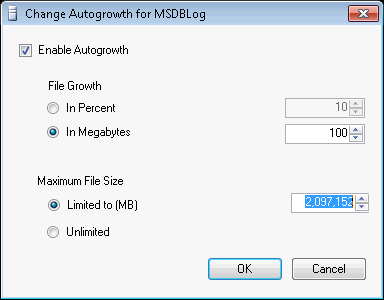
We set fixed maximum size for SQL Server databases and update the max size when required. But after installing Service Pack and Cumulative Updates the maximum size is reset to 2,097,152 MB for the MSDB log file:
I am going to submit this issue to the Microsoft Connect (hopefully it still works and active) or check if somebody else had similar issues. As this happens only with one system database and only with one file I would suspect that this is a bug.
This is just something to watch out and remember to review after SQL Server patching if you use fixed maximum files sizes.
Disk space these days is not as expensive as it used to be, but as a DBA I like to keep things tidy and optimize as much things as possible. Cleaning up databases and old backups, archiving databases are some of my regular tasks.
There will be a couple examples on MSDB database cleanup in this post with screenshots and reports.
MSDB database contains a lot of historical records related to the email, backups and maintenance plans. It does not usually grow too fast, but it may have a lot of historical information in large environments. If you do not maintain the history properly msdb sometimes can have years of history.
Keep in mind that some of the historical information is required for databases restores, for audit, etc. So, before you start cleaning up your database make sure that this does not go against your policies. Some DBAs base their restore scripts on the msdb database’s tables, this also has to be taken into consideration.
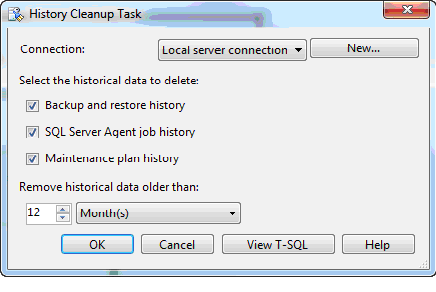
Some settings for the job history could be found under SQL Server Agent. Ideally you would setup “History Cleanup Task” using Maintenance Plans in SQL Server Management Studio (SSMS). This is quick and easy way:
But there are circumstances when you may need to do this manually, for example: SQL Server Agent is disabled on SQL Server; you inherited old SQL Server where history has not been cleaned up since server setup. Also, keep in mind that “History Cleanup Task” does not include Database Mail logs.
Manual Cleanup
Audit requirements in this example will be to keep 6 months of historical data and 6 months of backup history (based on Service Level Agreements). This is not real life scenario that we will be only using it to demonstrate database size changes after the cleanup.
I would like to keep email sending log for the last 6 months as well as evidence for auditors that I get e-mails about critical system errors.
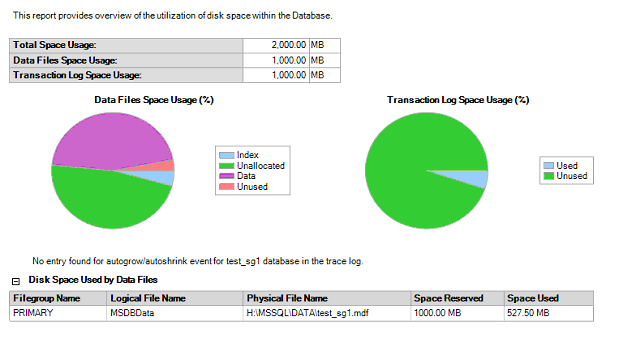
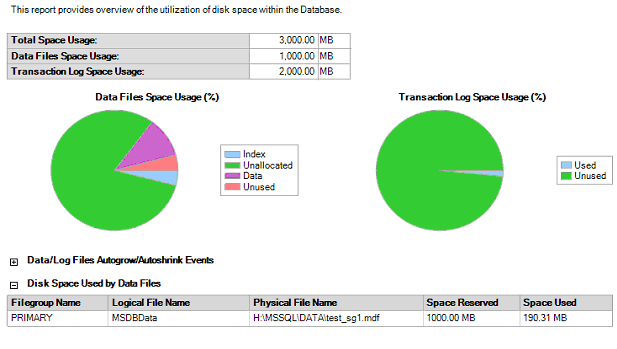
Here is the msdb database size on SQL Server with 50 databases and 1 year of history:
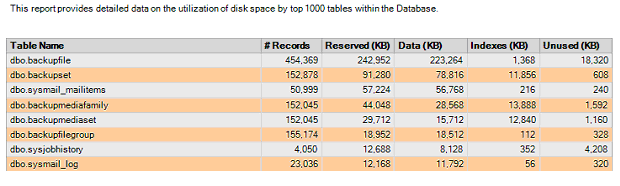
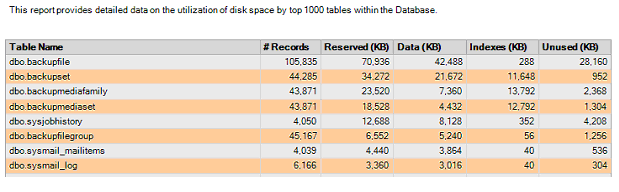
Let’s run SSMS report showing Disk Usage by Top Tables:
Step 1: Backup-restore history cleanup
This is done by executing sp_delete_backuphistory stored procedure. Here are the tables affected (as per BOL):
“… sp_delete_backuphistory must be run from the msdb database and affects the following tables:
backupfile
backupfilegroup
backupmediafamily
backupmediaset
backupset
restorefile
restorefilegroup
restorehistory
The physical backup files are preserved, even if all the history is deleted.”
This is done by executing sp_maintplan_delete_log stored procedure.
The sp_maintplan_delete_log stored procedure permanently deletes entries and details from the Maintenance Plans log (msdb.dbo.sysmaintplan_logdetail and msdb.dbo.sysmaintplan_log tables).