SQL Server 2016 CTP 2.2 is now available

SQL Server 2016 CTP 2.1 became available on June 24th 2015 about one month after Microsoft made public SQL Server 2016 CTP 2.0.

Today CTP 2.2 is available for download. Among all of the new Database Engine features Query Store stands out as a great addition to the performance tuning tools currently available out of the box.

Stay tuned for the MSSQLTips articles about SQL Server 2016 Query Store.

MSSQL Tips: Tip #20 – Monitor SQL Server Master Database Changes with WMI Alerts

In this new tip you will find out how to setup monitoring of the master database and get real time notifications when the new objects created there.

Please read the latest MSSQL Tip: “Monitor SQL Server Master Database Changes with WMI Alerts“.

Check out all of my tips here: http://www.mssqltips.com/sqlserverauthor/94/svetlana-golovko/.

ORA-01013 error troubleshooting

A user reported an application error ORA-01013. The error message was: “User requested cancel of current operation”. The user retried it several times, but had the same result.

The application uses Oracle database and there were no changes to the database since the last time when user was able to run this process.

The user was able to run the process in the test environment without any issues as well. I ran the same query from DBA query tool and the query completed successfully.
So, my first thought was that there was something wrong with application server itself.
After 10 minutes of checking similar issues (ORA-01013 error) online and on Oracle support site I found no explanation of why would this happen.

I started analyzing the query’s execution for both – for DBA’s execution and for the application.

So, when the query was running from the application it was running just for 15 seconds and then it was just cancelled (with error ORA-01013). It was cancelled every time after exact 15 seconds. When I ran the query myself it was running for about 2 minutes. The interesting thing was that SQL IDs for these two executions were different.

My next step was to find the query in cash plan:

select address, hash_value from v$sqlarea
where sql_text like ‘SELECT COUNT(*)%HERE IS THE PROBLEM SQL…%’ and sql_id<>’6munh028ah2bm’;

Where “6munh028ah2bm” was SQL ID of my execution.

Then I removed the “bad” plan from the cash:

exec sys.dbms_shared_pool.purge(‘00000004E2C255D8,1992735705′,’c’);
commit;

We have not tried to test it right after this, so I am not sure if this is enough to fix the problem. The next steps were to gather statistics for the tables related to the query.

This fixed the problem.

I thought I need to share this as I was not able to find anything helpful on the web during my troubleshooting. Hopefully next time it will safe time to somebody.

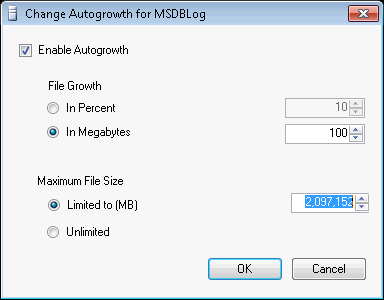
MSDB log file max size reset after SQL Patches

I have encountered this several times already after different Cumulative Updates/Service Packs…

We set fixed maximum size for SQL Server databases and update the max size when required. But after installing Service Pack and Cumulative Updates the maximum size is reset to 2,097,152 MB for the MSDB log file:
max size - msdb log

I am going to submit this issue to the Microsoft Connect (hopefully it still works and active) or check if somebody else had similar issues. As this happens only with one system database and only with one file I would suspect that this is a bug.

This is just something to watch out and remember to review after SQL Server patching if you use fixed maximum files sizes.

MSSQL Tips: Tip #19 – New SQL Server Database Request Questionnaire and Checklist

My new tip will help you to gather requirements for the new databases and have basic documentation from day one.

Please read the latest MSSQL Tip: “New SQL Server Database Request Questionnaire and Checklist“.

Check out all of my tips here: http://www.mssqltips.com/sqlserverauthor/94/svetlana-golovko/.

About usefulness of trivial tasks

I just wanted to share a story that one of my friends-DBAs shared with me.

So, they have internal DBAs responsible for the part of the environment and remote/external DBAs that look after another part of the environment.
In most cases these two groups do not look after each others environments and their responsibilities do not criss-cross. But my curious friend one day decided to do a little disk cleanup/checkup (from the old backups etc.) and discovered that archive logs for one of the mission critical databases have not been cleaned up for a year. The database was under the external group supervision.
After a short investigation my friend discovered that the database didn’t have backups for a year!

The moral is:
1) Even simple trivial tasks can sometimes help you to discover flows
2) Do not rely on third party contractors even if they have a very good reputation. Make an occasional checks. It wouldn’t heart to add a couple more servers to the monitoring.

MSSQL Tips: Tip #18 – Using Policy Based Management for SQL Server Availability Groups Data Loss Alerts

This tip is again on my favorite topic – Policy Based Management.

Please read the latest MSSQL Tip: “Using Policy Based Management for SQL Server Availability Groups Data Loss Alerts“.

Check out all of my tips here: http://www.mssqltips.com/sqlserverauthor/94/svetlana-golovko/.

MSSQL Tips: Tip #17 – Using Policy Based Management to check that SQL Server indexes are created in the correct filegroup

Another tip about using Policy Based Management for the SQL Server checks.

Please read the latest MSSQL Tip: “Using Policy Based Management to check that SQL Server indexes are created in the correct filegroup“.

Check out all of my tips here: http://www.mssqltips.com/sqlserverauthor/94/svetlana-golovko/.

MSSQL Tips: Tip #16 – Several Methods to collect SQL Server Stored Procedure Execution History

In this tip you can learn about stored procedures execution history monitoring.

Please read the latest MSSQL Tip: “Several Methods to collect SQL Server Stored Procedure Execution History“.

Check out all of my tips here: http://www.mssqltips.com/sqlserverauthor/94/svetlana-golovko/.

MSSQL Tips: Tip #15 – Automated collection of SQL Server database connections for monitoring

Here is a tip about automated monitoring of the high number of SQL Server connections.

Please read my latest MSSQL Tip: “Automated collection of SQL Server database connections for monitoring“.

Check out all of my tips here: http://www.mssqltips.com/sqlserverauthor/94/svetlana-golovko/.